
How to Recover a Forgotten Facebook Password: A Simple Guide
Forgot your Facebook password? This simple guide explains how to recover your account, receive a recovery code, reset your password, and protect your account afterward.
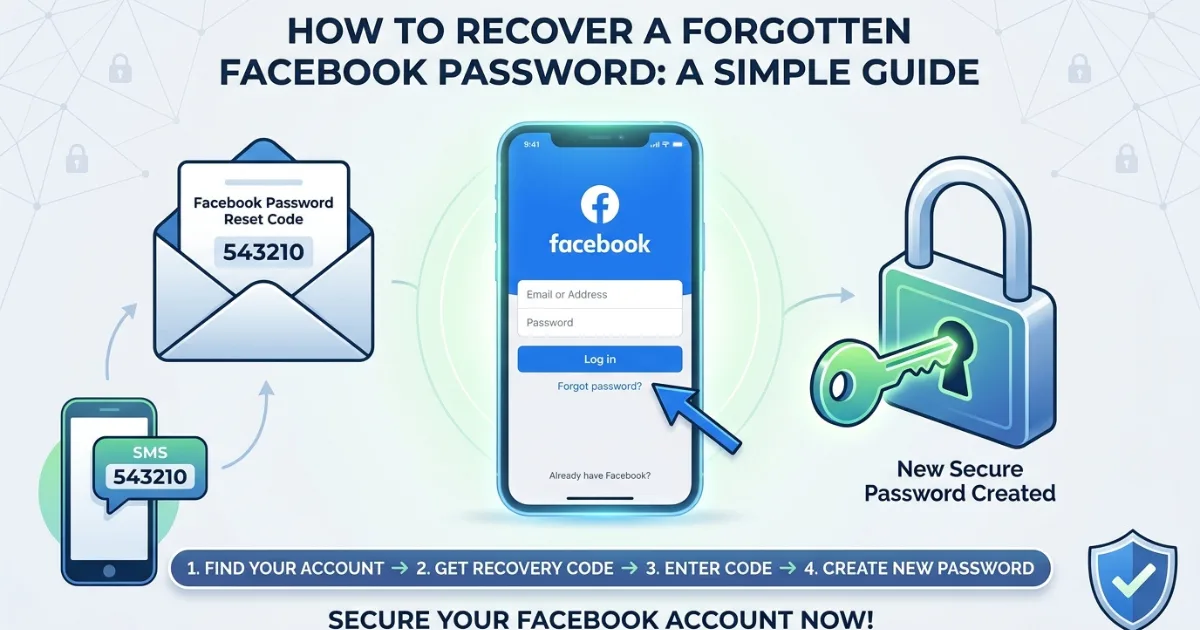
These steps work on phones and computers for many users. Forgetting a How to recover a forgotten Facebook password can turn a login into a frustrating moment, especially when you need your account quickly.
Why can’t I log in to Facebook?
A forgotten password is one of the most common reasons people get locked out of an account.
Before trying random passwords, stop and use Facebook’s official recovery process. Too many failed attempts can create extra security checks and make the process more frustrating. Facebook’s login page includes an account-recovery option for people who cannot remember their login details (source: Facebook).
How to recover a forgotten Facebook password?
The basic recovery process is simple. Then follow these steps:
Enter the email address, mobile number, or other account detail Facebook requests.
Select your account when Facebook finds it.
Choose where you want to receive a recovery code, if options are available.
Enter the code you receive.
Create a new password.
Follow any additional security instructions shown on screen.
Can I recover Facebook without my old password?
Yes. You do not normally need to know your old password to start account recovery. Facebook can verify that you are the account owner through available recovery methods.
If you still control the email address or phone number linked to your profile, recovery is usually easier. Check that you are entering the correct contact information. An old phone number, misspelled email address, or different account can lead you to the wrong recovery result.
What if I no longer have access to my email or phone?
This is where recovery can become more difficult. If your old email account or phone number is unavailable, Facebook may offer other verification or account-recovery choices.
Do not give your password or recovery code to another person. Be especially careful with messages claiming to be Facebook support. Legitimate recovery should happen through Facebook’s official website or app.
Can I reset my Facebook password from a phone?
Yes. Open the login screen and select the account-recovery option. Enter the requested account information and continue through the instructions.
Scammers often imitate familiar login pages to steal passwords and verification codes. Avoid links sent through unexpected emails, social media messages, or pop-ups.
What should I do after resetting my Facebook password?
Once you regain access, take a few minutes to secure the account. Consider these steps:
Create a strong, unique password that you do not reuse elsewhere.
Review the email addresses and phone numbers connected to your account.
Check recent login activity for devices or locations you do not recognize.
Turn on available two-factor authentication.
Remove unfamiliar apps or sessions connected to the account.
Keep your recovery information current.
Why might Facebook not send my recovery code?
First, check your email spam or junk folder and confirm that your phone has service. Also confirm that the contact information shown during recovery belongs to you.
If you suspect someone changed your account information, use Facebook’s official account-recovery tools rather than paying a third party. Never post your recovery code publicly.
How can I protect my Facebook account from future password problems?
Keep your contact information updated and use a password manager if remembering multiple strong passwords is difficult.
A good password should be difficult to guess and different from passwords used for email, banking, shopping, or other social networks. Two-factor authentication adds another layer of protection because a password alone is not enough to complete certain sign-ins.
For more social-media security advice, [insert related article link here].
Is it safe to use third-party Facebook password recovery services?
No. Be cautious about anyone offering to recover your Facebook password for a fee. If a website asks for unusual payment details, remote computer access, or a verification code, stop and leave the page.
Facebook will not require you to send your password to another person so they can log in for you.
What is the quickest way to regain access?
The quickest route is usually the official Facebook recovery process using an email address or phone number already connected to your account. Complete each verification step carefully.
Once you are back inside, change the password and review security settings.
Final takeaway
Knowing how to recover a forgotten Facebook password can save time when you suddenly lose access. Start with Facebook’s official recovery option, verify your identity using available contact methods, and create a strong new password. If your old email or phone is unavailable, recovery may take additional steps, so keep your account information updated whenever possible. Most importantly, never share passwords or recovery codes with strangers. A careful recovery process can get you back online while helping keep your account safer in the future.
FAQs:
How do I recover a forgotten Facebook password?
Use Facebook’s official recovery option, verify your account, and create a new password.
Can I recover Facebook without my old password?
Yes, you can usually begin account recovery without knowing your previous password.
What if I cannot access my Facebook recovery email?
Try Facebook’s available recovery options or recover access to the email account first.
Why am I not receiving my Facebook password reset code?
Check spam folders, phone service, and whether the displayed recovery contact information is correct.
How can I keep my Facebook account secure after recovery?
Use a unique password, review login activity, update recovery details, and enable two-factor authentication.
Comments (0)
Be the first to comment.
Related stories
 International News
How to Increase Facebook Followers: Simple Strategies That Work
Want more Facebook followers without relying on fake accounts? Discover practical strategies for better content, Reels, engagement, collaborations, and organic growth.
 International News
How to Create a Facebook Page: Easy Step-by-Step Guide
Want to build your presence on Facebook? This simple guide explains how to create a Facebook page, complete your profile, publish content, and grow your audience.
 International News
How to Create a Facebook Account: A Simple Beginner's Guide
Want to join Facebook but unsure where to start? This simple guide explains how to create an account, secure your profile, and adjust your privacy settings.