
Link in Bio Instagram: How It Works and How to Use It
A link in bio can turn an Instagram profile into a useful gateway for websites, stores, newsletters, bookings, and other online destinations.
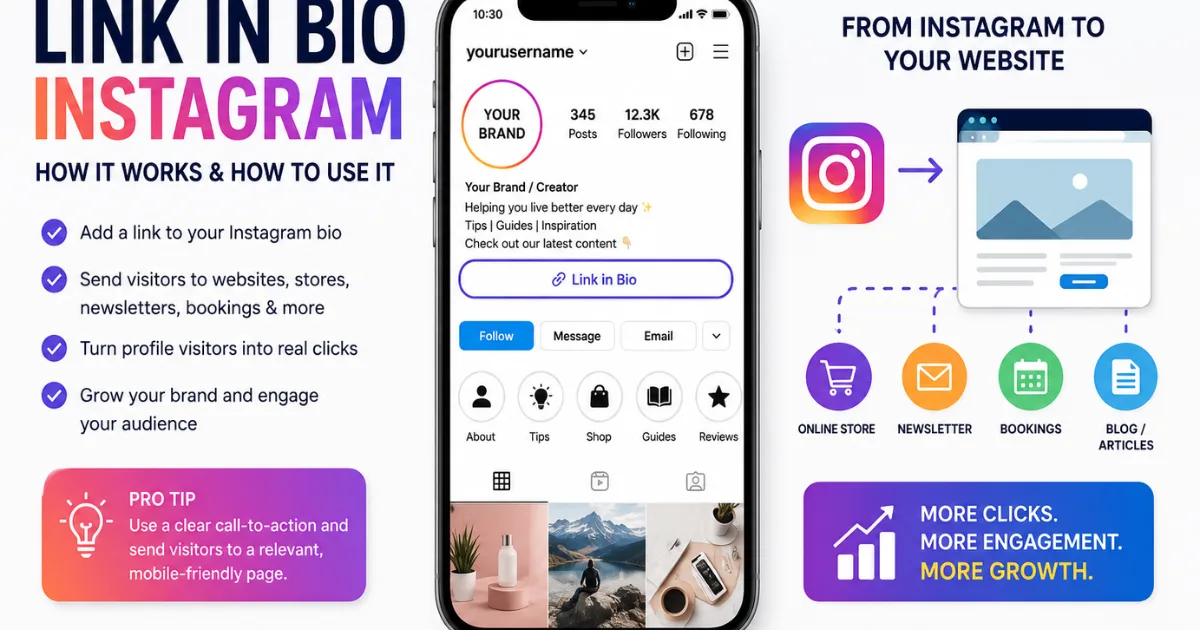
The phrase link in bio Instagram appears everywhere, from creator posts to small-business reels. It is a simple instruction telling people where to find a clickable link on an Instagram profile. For creators, brands, freelancers, and community pages, that small link can become an important bridge between social media and a website, shop, newsletter, booking page, or other destination. A clear destination also helps visitors trust the account and understand exactly what they will find after leaving Instagram quickly.
What does link in bio Instagram mean?
A link in bio Instagram simply means a clickable web link placed on an Instagram profile. Instead of putting a long website address into every caption, a creator can direct visitors to the profile and tell them to tap the link in the bio.
This approach is useful because Instagram posts often work as discovery tools. A person may see a product, video, article, or announcement, then visit the profile to learn more. The bio link gives that visitor a clear next step.
Where is the Instagram bio link located?
The link normally appears in the profile area beneath the account's introductory information. A visitor can open the profile, look for the link, and tap it to visit the connected destination.
How do you add a link in bio on Instagram?
Adding a link is usually straightforward. Open your Instagram profile, choose the option to edit the profile, find the links area, and add the web address you want visitors to open. Review the displayed title or label, save the change, and then test the link from the public profile.
Before publishing, check three things:
The URL works correctly.
The destination looks good on a mobile phone.
The page explains what visitors should do next.
How many links can you put in an Instagram bio?
Instagram has expanded profile-link options over time, allowing eligible users to place multiple links on a profile rather than relying on only one destination. Features and availability can change, so account owners should check Instagram's current settings for the options available to them.
Multiple links can help people with several goals. A creator might want links for a YouTube channel, newsletter, online store, and latest article. A business might connect a booking page, product catalog, support page, and company website.
Why is a link in bio important for creators and businesses?
The link can turn attention into action. Instagram may help people discover an account, but the bio link can send those visitors somewhere the owner controls, such as a website or store.
The key is matching the link to the reason people followed the account. If a post promotes a new guide, the bio should make finding that guide easy.
What should you put behind your Instagram bio link?
Choose a destination that gives visitors immediate value. Good options include:
A personal or business website
A specific product or service page
A newsletter signup
A portfolio
An appointment or booking page
A current campaign or event
A useful resource or downloadable guide
Avoid sending every visitor to a generic homepage if a more relevant page exists. Someone arriving after seeing one product should not have to search through several menus to find it.
For more Instagram profile tips, [insert related article link here].
Should you use a link-in-bio landing page?
A link-in-bio landing page can be useful when you need to organize several destinations under one profile link. Instead of choosing one website, the page can present a short menu of important options.
They should load quickly, work well on mobile devices, and use descriptive buttons. “Shop New Collection” is clearer than “Click Here.”
Do not overload the page with unnecessary buttons. Give visitors a small number of meaningful choices and keep the most important one near the top.
How can you optimize your Instagram bio link for clicks?
Start with relevance. The link should support the content people are already viewing. Then make the next step obvious.
Use clear calls to action such as “Shop the new collection,” “Read the full guide,” “Book a consultation,” or “Join the newsletter.” Avoid vague wording that gives visitors no reason to tap.
What mistakes should you avoid?
One major mistake is forgetting to update the link. A campaign may end, but the old destination can remain in the profile for weeks. Another mistake is sending visitors to a page that is difficult to use on mobile.
Avoid misleading labels, excessive pop-ups, slow pages, and destinations unrelated to the content that attracted the visitor. Trust matters. A profile that promises one thing and delivers another can lose credibility quickly.
Instagram's official Help Center is the best place to check current profile and link features because platform controls can change. (source: Instagram Help Center)
Is a link in bio better than putting links in captions?
The answer depends on the feature and goal. A profile link provides a consistent destination that can remain available across posts. That makes it useful when many posts point toward the same website, store, or campaign.
The important thing is to give people a clear instruction. If you want them to visit the profile, say so naturally in the post or video. Then make sure the destination is relevant when they arrive.
What is the best strategy for link in bio Instagram?
The best strategy is simple: connect the link in bio instagram to a clear goal. Decide what action matters most, send visitors to the most relevant page, and keep the experience easy on mobile.
Review the destination regularly. Update expired promotions, replace broken pages, and change the priority when your campaign changes. Your Instagram profile may be the first place a new visitor learns about your brand, so the link should feel like a helpful next step rather than an afterthought.
A strong bio link does not need complicated technology. It needs a useful destination, clear wording, and a smooth journey from Instagram to the next page. That combination can make a small profile feature much more valuable.
FAQs:
What does link in bio mean on Instagram?
It means a clickable website link placed on an Instagram profile for visitors to open.
Where is the link in bio on Instagram?
It appears in the profile area where visitors can tap the available profile links.
How do I add a link to my Instagram bio?
Open your profile, select Edit Profile, find the links option, add your URL, and save it.
Can you have multiple links in an Instagram bio?
Instagram supports multiple profile links for eligible accounts, although available features can change.
What should I put in my Instagram bio link?
Choose the most relevant destination, such as your website, store, portfolio, newsletter, or booking page.
Comments (0)
Be the first to comment.
Related stories
 Lifestyle & Fashion
How to Create an Instagram Account: Easy Step-by-Step Guide
Creating an Instagram account is quick and simple. Here is a practical step-by-step guide covering signup, usernames, profiles, privacy, security, and what to do next.
 Lifestyle & Fashion
How to Increase Instagram Views Fast: 10 Smart Tips
Want more Instagram views without buying fake engagement? These practical Reel strategies can help you reach more people, improve retention, and grow naturally.
 Lifestyle & Fashion
Instagram Reels Tips for Maximum Engagement in 2026
Want more views, likes, shares, and comments on your Reels? These practical strategies can help creators make engaging videos and build a stronger Instagram audience.